Inception
- First, we started with normal HTML and then wrote
<h1>Namaste React</h1>inside the root element. - Then, Akshay showed us how to do the same thing with JavaScript. Below is the code to add
<h1>Namaste React</h1>inside the root element.
<script>
  const root = document.getElementById("root");
  const h1 = document.createElement("h1");
  h1.textContent = "Namaste React";
  root.appendChild(h1);
</script>
- Very easy, we all have worked with JS, and we know DOM Manipulation.
- We know the browser provides us with a DOM API to directly interact with HTML elements and make our websites dynamic.
It's Time to add React to our code
But we aren't going to do npm create react app yet. Wait!
- In this lecture, we started with simple React and React-DOM using a CDN. This demonstrates what a library is all about—libraries are simple and lightweight.
- We can easily import them and start working with them.
- However, the same can't be done with frameworks. Frameworks impose certain rules and structures that we must follow.
Key Points:
- React and React-DOM are libraries, which are typically more flexible and lightweight.
- Frameworks require adherence to specific conventions and provide a more structured environment.
To learn more about using React with a CDN, you can refer to the official React CDN documentation.
Now add both the CDN links to the index.html file in the <script> tags at the end of the <body> tag to add React to your project.
<body>
  <div id="root"></div>
  <script
    crossorigin
    src="[https://unpkg.com/react@18/umd/react.development.js](https://unpkg.com/react@18/umd/react.development.js)"
  ></script>
  <script
    crossorigin
    src="[https://unpkg.com/react-dom@18/umd/react-dom.development.js](https://unpkg.com/react-dom@18/umd/react-dom.development.js)"
  ></script>
</body>
As soon as we add these CDN links, we'll gain the superpower of React and ReactDOM.
We can check this by opening the browser console and typing React and ReactDOM. Below is what we should see:
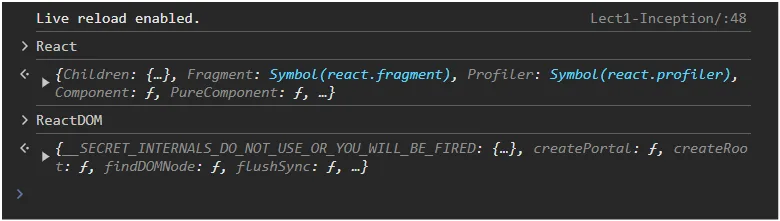
Now we will write React code to render Namaste React on our webpage.
Add the following script to your index.html file within the <script> tags, placed at the end of the <body> tag:
<script>
  const heading = React.createElement("h1", {}, "Namaste React!!");
  const root = ReactDOM.createRoot(document.querySelector("#root"));
  root.render(heading);
</script>
Well, React is very intuitive to understand, but for reference, here is the explanation for each line of code:
- Creating a React Element
const heading = React.createElement("h1", {}, "Namaste React!!");
- This line creates a React element representing an
<h1>HTML tag with the text "Namaste React!!". TheReact.createElementfunction is used to create elements that will be rendered (added into the HTML DOM) by theReact.render()method. - In the
React.createElement()method, we have{}, an empty object. In this, we can pass props, like addingid,class, orstyledirectly to the tag.
- Selecting the Root Element
const root = ReactDOM.createRoot(document.querySelector("#root"));
- This line selects the DOM element with the ID "root" and prepares it as the root for React rendering.
ReactDOM.createRootinitializes a React root that will manage the React tree.
- Rendering the Element
root.render(heading);
- This line renders the
headingReact element into therootelement. Theroot.renderfunction injects theheadingelement into the DOM at the location of therootelement. It will override the content of therootelement.
Key Points:
- React elements, at the end of the day, are objects. If we do
console.log(heading)andconsole.log(root), we will get objects in return. - We can add React into our existing HTML project.
- So, suppose if we want to add React to a
SearchBar, just make that element theroot, and we can write React code for that. (But this is not recommended). - We generally have one
root, and we write all our React code inside thatroot, no matter how large the application is.
Interesting Question from Akshay Saini
What will happen if we add lots of other elements inside the root element where React is rendering?
Consider the following HTML:
<body>
  <div id="root">
    <h1 id="title">Hello World</h1>
    <h1 id="title">Hello World</h1>
    <h1 id="title">Hello World</h1>
  </div>
</body>
In this case, what will happen to the heading rendered by React? Will it appear before or after all the existing tags?
- Well, the
react.render()method overwrites everything inside theroot. - This approach in React ensures that the entire content of the root element is controlled by the content specified in the
ReactDOM.render()call.
Developer Community Practice
In the developer community, it is common to place the text Not Rendered inside the root element to help identify issues with React rendering.
Consider the following HTML:
<body>
  <div id="root">Not Rendered</div>
</body>
If
Not renderedis printed on the web page, that means there is some error with React rendering, and React is not able to modify theroot.Since the
<script>tags are placed at the end of the<body>tag, the browser first renders the HTML and displaysNot Renderedbefore executing the React scripts.If everything is set up correctly, React will modify the contents of the root element after the page has loaded and the scripts have been executed.
React's core philosophy was to write everything in JS files, leaving the HTML file as it is. But the older way, with creating
React.createElement()and thenReactDOM.createRoot()and so on, was not suitable for big applications.It was very verbose and complicated to write this much code just for creating simple
h1anddivtags and then rendering them to HTML.
So JSX was built
- The introduction of JSX (JavaScript XML) in 2013 was a significant step forward in making React development more intuitive and readable.
- JSX allows developers to write HTML-like syntax directly within JavaScript files.
- Under the hood, JSX files are translated into React's native way of writing code, and then that is again translated to normal HTML, CSS, and JS.
- Babel is the tool responsible for converting JSX code into native React code.
- It processes JSX syntax and transforms it into plain JavaScript that browsers can understand and execute.
Here's a brief comparison of using React.createElement() versus JSX:
Using React.createElement():
const element = React.createElement('h1', null, 'Hello, world!');
Using JSX:
const element = <h1>Hello, world!</h1>;
- The JSX syntax is much cleaner and easier to understand because of its HTML-like structure.
Thanks to JSX for making our lives easier.